


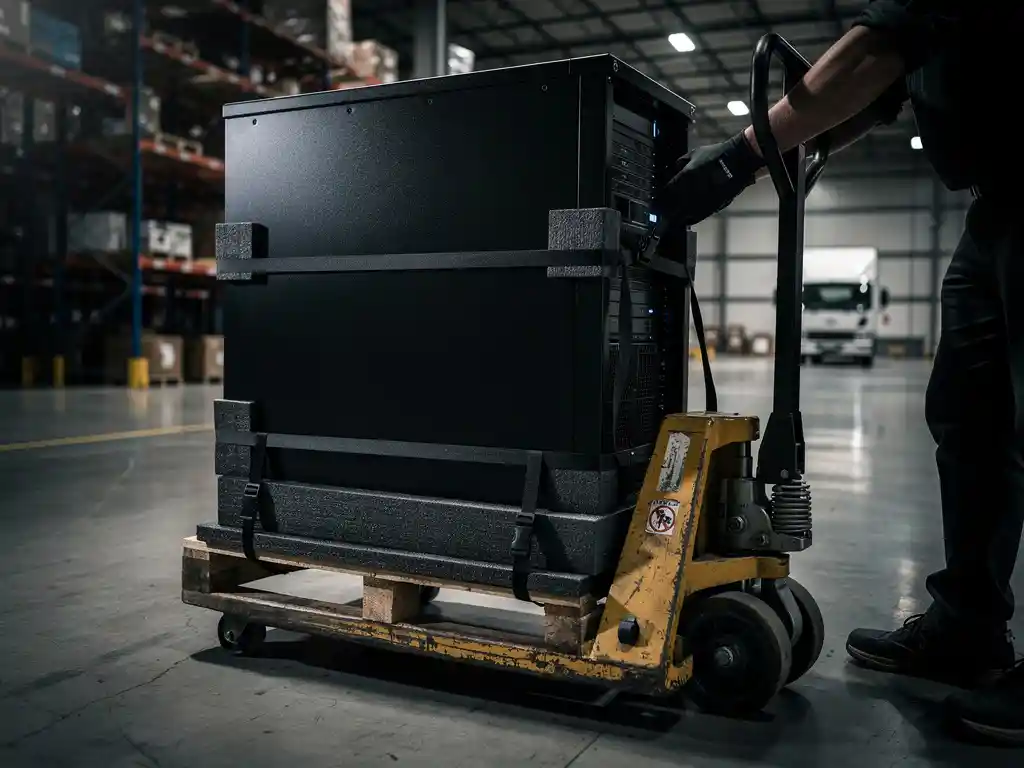
Server racks contain some of the most sensitive and valuable equipment in any organization, and moving them incorrectly can result in hardware failure, data loss, or costly downtime. The correct way to move server racks involves careful preparation, the right equipment, trained personnel, and a structured reinstallation process. This article walks through every key question you should ask before, during, and after a server rack move.
What are the biggest risks when moving server racks?
The biggest risks when moving server racks are physical damage to hardware, data corruption, electrostatic discharge, and downtime caused by improper disconnection or reconnection. Server components are precision-engineered and highly sensitive to vibration, shock, and moisture, making even a short-distance move potentially damaging if not handled correctly.
Hard drives are particularly vulnerable. Spinning disk drives can suffer head crashes from even moderate impact, while SSDs are more resilient but still susceptible to static damage. Beyond the drives themselves, cables, power supply units, and motherboards can all be damaged by rough handling or sudden jolts during transit.
Electrostatic discharge (ESD) is a risk that is easy to overlook. A static charge that is imperceptible to a person can permanently damage a server component. Without proper ESD precautions, technicians handling equipment during a move can unknowingly destroy hardware worth thousands of euros.
There is also the risk of data loss if servers are not properly shut down before being moved. Pulling power from a running system or moving a drive while it is still spinning can corrupt file systems or destroy data entirely. Downtime risk compounds this: the longer a move takes, the longer critical systems are offline, which can have serious operational and financial consequences for any business.
How should server racks be prepared before transport?
Server racks should be prepared for transport by performing a controlled shutdown of all systems, labeling every cable and component, removing or securing loose hardware, and documenting the configuration before anything is disconnected. Thorough preparation before the move is what prevents most of the problems that occur during or after transport.
Start with a full inventory and photographic documentation of the rack’s current state. Photograph cable routing, component positions, and any labels already in place. This documentation becomes your reference when reinstalling at the destination.
Next, shut down all servers in the correct sequence. This means closing applications, allowing operating systems to complete their shutdown procedures, and only then cutting power. Rushing this step is one of the most common causes of data corruption during a move.
Once powered down, label every cable at both ends before disconnecting anything. Color-coded labels or numbered tags work well. Remove any components that are not securely fixed, such as loose drives in hot-swap bays, and pack them separately in anti-static bags. Rail-mounted servers should either be secured within the rack or removed and packed individually, depending on the distance and mode of transport.
Finally, seal rack doors and any open bays with blanking panels or protective covers to prevent dust ingress and accidental contact during the move.
What equipment is needed to safely move a server rack?
To safely move a server rack, you need a heavy-duty server rack dolly or pallet jack, anti-static packaging materials, foam padding or shock-absorbing wrapping, cable ties, and appropriate lifting equipment for the weight involved. Using the wrong equipment is one of the fastest ways to damage hardware or injure personnel.
Server racks are heavy. A fully populated rack can weigh several hundred kilograms, which means standard furniture dollies or hand trucks are not adequate. Dedicated server rack transport dollies are designed to support this weight and allow controlled movement across floors, ramps, and loading areas.
For the components removed from the rack, anti-static bags are essential. Hard drives, RAM, and expansion cards must never be transported in ordinary plastic bags or cardboard boxes without ESD protection. Foam-lined cases or custom server transport cases offer an additional layer of shock protection for sensitive components.
Inside the transport vehicle, the rack must be secured against movement using load straps. It should be transported in an upright position wherever possible, as laying a rack on its side places stress on components that are not designed to bear weight from that angle. Climate-controlled vehicles are worth considering for long-distance moves, particularly in extreme weather conditions, since both heat and condensation can cause hardware damage.
Should server racks be moved empty or fully loaded?
Server racks should generally be moved empty or with only securely fixed components in place. Removing servers, drives, and loose hardware before transport significantly reduces the risk of damage and makes the rack safer and easier to handle. Whether you can move a rack partially loaded depends on the distance, transport method, and how well components are secured.
For short moves within the same building, a fully populated rack may be moved intact if the floor surface is level, the rack is on a suitable dolly, and all components are firmly secured. Even then, hard drives in hot-swap bays should be removed and transported separately, as these are the components most vulnerable to vibration.
For moves between buildings or over longer distances, the safest approach is to remove all servers and components, pack them individually, and transport the empty rack frame separately. This approach adds time to the move but dramatically reduces the risk of hardware failure. It also makes the rack lighter and easier to load onto a vehicle safely.
If a decision is made to move a rack with some equipment still installed, every component must be mechanically secured, not simply slotted into place. Rail-mounted servers should be locked or strapped, and all cable connections should be checked for tension that could pull loose during transit.
How do logistics providers handle server rack transport?
Professional logistics providers handle server rack transport by using specialist equipment, trained personnel, clean-room environments where needed, and coordinated planning to minimize downtime. The difference between a general freight carrier and a specialist logistics partner is significant when it comes to high-value, sensitive IT equipment.
We at Jan Krediet have direct experience in this area. As part of our project logistics services, we assemble and handle server cabinets in a dust-free clean room within our warehouse for a major business IT solutions provider. We also provide warehousing, refurbishment of server units, and worldwide distribution, treating high-tech logistics with the same level of precision and care we apply to every specialist sector we serve.
A professional logistics provider will assign a dedicated project team to plan the move from start to finish, covering disconnection, packing, transport, and reinstallation. This team-based approach ensures that nothing is left to chance and that every detail of the move is documented and managed. For complex IT infrastructure moves, just-in-time planning is often applied to minimize the window during which systems are offline.
Climate-controlled transport, ESD-safe packaging, load-secured vehicles, and experienced handlers are all standard expectations from a qualified logistics partner. For organizations moving server infrastructure across borders, customs clearance and international coordination also become part of the service, which is something a general carrier is rarely equipped to handle.
What should be checked after a server rack is reinstalled?
After a server rack is reinstalled, you should verify physical cable connections, check component seating, confirm power supply integrity, inspect for any visible damage, and then perform a staged power-on sequence before returning systems to full operation. Reinstallation is where many moves fail if checks are skipped in the rush to restore services.
Begin with a visual inspection of the rack and all components before powering anything on. Look for loose cables, components that are not fully seated, and any physical damage that may have occurred during transit. Compare the current state against the photographs taken before the move.
Check every cable connection individually. Even cables that appear connected may not be fully seated after the movement and vibration of transport. Pay particular attention to power cables, data cables, and any fiber connections, which can be damaged by bending or tension.
When you are ready to power on, do so in stages. Start with the core infrastructure, such as switches and storage, before bringing up servers. Monitor each system as it boots for error messages, unexpected behavior, or hardware alerts. Many server management systems will flag component errors on startup, which gives you an early warning of any damage that occurred during the move.
Finally, run a full functional test of each system before declaring the move complete. This includes network connectivity, storage access, and application availability. Keeping a checklist and signing off each item ensures nothing is missed and gives you a clear record of the post-move state of your infrastructure.