


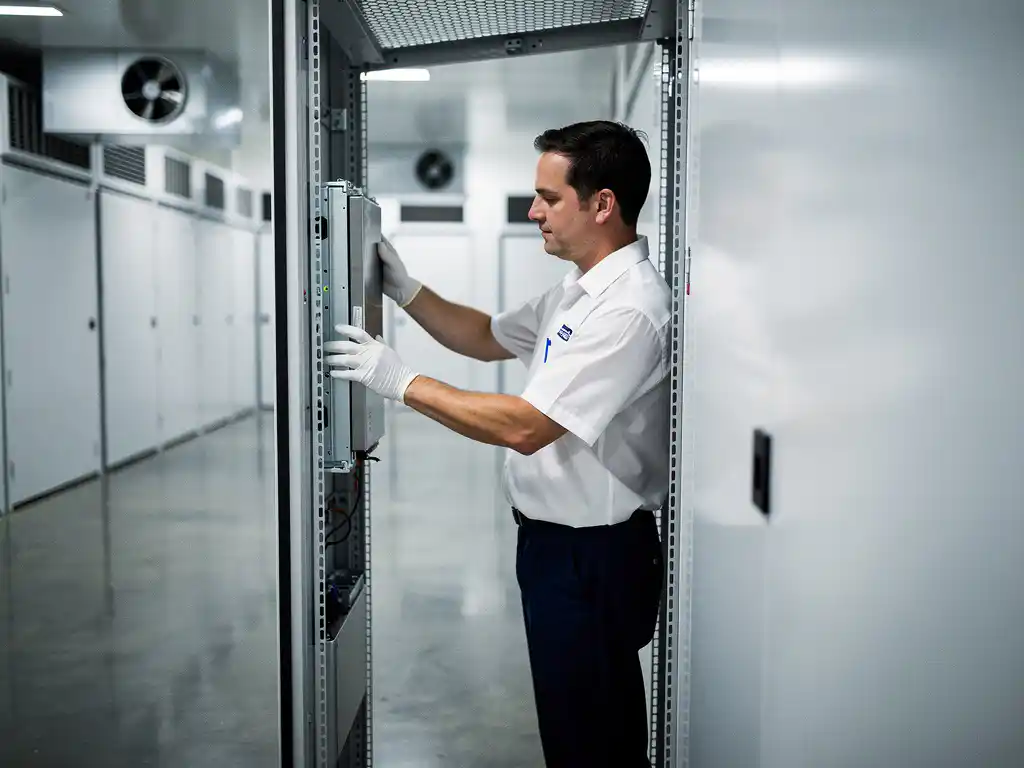
A dust-free environment for IT hardware is maintained through a combination of HEPA filtration systems, positive air pressure rooms, strict access controls, humidity regulation, and regular professional cleaning protocols. These measures work together to prevent particulate matter from settling on sensitive electronic components. The sections below break down each factor in detail, from the types of dust that cause the most harm to how dust-free conditions are preserved during logistics and warehousing.
What types of dust cause the most damage to IT hardware?
The most damaging types of dust for IT hardware are conductive particles, fibrous debris, and fine carbon-based particulates. Conductive dust can create unintended electrical pathways across circuit boards, while fibrous and organic particles trap heat and moisture against components. The finer the particle, the deeper it penetrates into connectors, fans, and heat sinks, where it causes the most harm.
Not all dust is equal when it comes to electronic equipment. The key factors that determine how destructive a particle is include its size, conductivity, and tendency to absorb moisture. Here is a breakdown of the most problematic categories:
- Conductive metallic dust: Found in industrial or mixed-use environments, these particles can bridge circuits and cause short circuits or erratic hardware behavior.
- Carbon and graphite particles: Common near printing equipment or certain flooring materials, these are both conductive and adhesive, making them particularly stubborn to remove.
- Fibrous particles: Clothing fibers, paper dust, and insulation fragments wrap around fan blades and clog ventilation channels, reducing airflow and accelerating thermal stress.
- Fine silica and construction dust: Abrasive and hygroscopic, this type of dust accelerates corrosion on metal contacts and connector pins.
- Skin flakes and biological particles: While less conductive, these organic particles support microbial growth in humid conditions, adding a biological risk layer to the physical one.
Understanding which dust types are present in a given environment is the first step toward choosing the right filtration and cleaning strategy for server equipment and other sensitive IT hardware.
How does dust actually damage servers and electronic components?
Dust damages servers and electronic components primarily through three mechanisms: thermal insulation that causes overheating, electrical interference from conductive particles, and physical abrasion or corrosion of contacts and connectors. Even a thin layer of accumulated dust on a processor heat sink can raise component temperatures significantly, shortening operational lifespan and increasing the risk of unexpected failures.
The most immediate and common consequence of dust accumulation is thermal degradation. Servers generate substantial heat during operation, and their cooling systems, which rely on fans, heat sinks, and airflow channels, are designed to dissipate that heat efficiently. When dust coats these surfaces, it acts as an insulating blanket. Components run hotter than their design specifications, which accelerates wear on capacitors, solder joints, and memory modules.
Beyond heat, conductive dust particles that settle across circuit board traces or between connector pins can cause intermittent short circuits. These are among the most difficult hardware faults to diagnose because they may only manifest under specific temperature or load conditions. Corrosive particles, particularly those that absorb ambient moisture, attack metal contacts over time, increasing electrical resistance and degrading signal integrity.
Fan bearings are another common casualty. Dust-laden fans run louder, draw more power, and fail earlier than clean ones. When a cooling fan fails in a server environment, thermal protection mechanisms may shut down the unit entirely, causing unplanned downtime. In a data center or server room context, this chain of events underscores why maintaining a dust-free environment for server equipment is not a cosmetic concern but an operational necessity.
What filtration systems are used in dust-free IT environments?
Dust-free IT environments typically use HEPA (High-Efficiency Particulate Air) filtration as the primary defense, often combined with positive pressure ventilation, pre-filters to extend HEPA life, and, in high-specification environments, ULPA (Ultra-Low Penetration Air) filters for submicron particle control. The goal is to continuously remove airborne particles before they can settle on hardware.
HEPA and ULPA filtration
HEPA filters capture at least 99.97% of particles at 0.3 microns in diameter, which covers the vast majority of dust, pollen, mold spores, and many bacteria. In standard server rooms and clean warehousing environments, HEPA filtration is considered the industry benchmark. ULPA filters go further, capturing particles down to 0.12 microns, and are used in semiconductor manufacturing or medical device storage where even finer contamination control is required. For most IT hardware logistics and warehousing operations, HEPA-grade filtration provides the appropriate level of protection.
Positive pressure and pre-filtration systems
Filtration alone is not enough if contaminated air can enter through gaps, doors, or poorly sealed walls. Positive air pressure systems solve this by maintaining the air pressure inside the controlled room slightly higher than the surrounding area. This means air flows outward whenever a door opens, preventing unfiltered external air from entering. Pre-filters placed upstream of HEPA units capture larger particles, extending the life of the more expensive fine filters and reducing maintenance frequency. Together, these systems form a layered defense that keeps particulate counts consistently low.
How often should IT hardware be professionally cleaned to prevent dust buildup?
IT hardware in active server rooms or warehousing environments should be professionally cleaned at least once every six to twelve months, with more frequent cleaning required in high-traffic or dusty environments. Regular visual inspections every one to three months allow teams to identify accelerated buildup before it causes thermal or electrical problems.
The appropriate cleaning interval depends on several variables: the air quality of the surrounding environment, the density of equipment in the space, the effectiveness of the filtration system, and whether the hardware is in active operation or in storage. A server room with strong HEPA filtration and positive pressure may only need professional cleaning annually, while equipment stored in a standard warehouse without dedicated air filtration may require attention every quarter.
Professional cleaning of server equipment goes beyond blowing out dust with compressed air. Qualified technicians disassemble components where necessary, use antistatic tools and materials, inspect connectors and fan assemblies, and document the condition of each unit. This process is especially important for high-value hardware that will be refurbished, redeployed, or redistributed, where the condition of the equipment directly affects its residual value and reliability.
Preventive cleaning schedules should be treated as a maintenance commitment rather than a reactive measure. Waiting for a hardware failure or a visible dust layer before cleaning is a false economy, particularly when the cost of downtime or component replacement is factored in.
What role does humidity control play in dust-free IT storage?
Humidity control is essential in dust-free IT storage because moisture makes dust particles adhesive and corrosive, dramatically increasing the damage they cause to electronic components. The recommended relative humidity range for IT hardware storage is between 40% and 60%, a level that prevents both static electricity buildup, which occurs in overly dry conditions, and condensation or corrosion, which occurs when humidity is too high.
When humidity is too low, typically below 35% relative humidity, the risk of electrostatic discharge (ESD) increases significantly. Static electricity can permanently damage sensitive semiconductor components even without a visible spark, making low humidity a silent threat in storage and handling environments. When humidity is too high, moisture condenses on cold metal surfaces, accelerates oxidation on connector pins, and creates conditions where conductive dust particles become far more likely to bridge circuits.
Humidity and dust control are closely linked because hygroscopic dust particles, those that absorb water from the air, become more conductive and more adhesive when relative humidity rises. A particle that sits harmlessly on a surface in dry conditions may become a corrosion catalyst or a short-circuit risk when the environment becomes humid. This is why effective IT hardware storage environments combine filtration with active climate control, using dehumidifiers, air conditioning, or precision environmental control units to hold conditions within the safe operating band year-round.
How is dust-free storage handled during IT hardware logistics and warehousing?
Dust-free storage during IT hardware logistics and warehousing is achieved through dedicated clean room facilities within the warehouse, controlled access procedures, antistatic packaging, and trained handling staff. The storage environment must maintain filtration, climate control, and cleanliness standards continuously, not just during active handling, to protect hardware throughout its time in the logistics chain.
At Jan Krediet, we have direct experience applying these standards in practice. We assemble and store server cabinets for a major business IT solutions provider in a dedicated dust-free clean room within our warehouse, combining this with refurbishing services and worldwide distribution. Our warehousing solutions are designed to meet the specific requirements of high-tech clients, where standard storage conditions are simply not sufficient.
The key elements that define a logistics-grade dust-free storage environment include:
- Dedicated clean room or controlled zone: A physically separated area within the warehouse with its own filtration, positive pressure, and access control, preventing cross-contamination from general cargo handling nearby.
- Antistatic flooring and workstations: Reduces ESD risk during handling, particularly important when equipment is unpackaged for inspection, assembly, or refurbishment.
- Antistatic and sealed packaging: Hardware in transit should be protected in ESD-safe bags and sealed outer packaging to prevent dust ingress during transport.
- Trained personnel: Staff working in clean room logistics environments wear appropriate protective clothing, including lint-free gloves and, where required, coveralls, to prevent introducing fibrous or biological particulates.
- Documentation and condition reporting: Every unit entering and leaving the controlled storage area should be logged with its condition recorded, supporting traceability and quality assurance throughout the logistics process.
For organizations managing large volumes of IT hardware across multiple locations, partnering with a logistics provider that operates certified clean room warehousing removes the complexity of maintaining these standards in-house. You can explore our contract logistics services or review our client cases to see how we handle high-tech logistics in practice. If you have specific requirements around dust-free storage or IT hardware handling, our team is ready to discuss a tailored solution.